Run a runner
A runner is a machine that takes flights and carries them out. It clones the repository, holds the credentials, runs the agent, and reports what happened to the control plane. Any machine with gg installed can be a runner. There are two ways to run one:
- From a terminal, with
gg runner up. This suits a laptop: the runner works while the command runs and stops when it is stopped. - As a service, which the operating system starts at boot and restarts if it exits. This suits a machine whose job is to take work.
All of an organisation’s runners together are its fleet.
Tell the runner which agent to run
Section titled “Tell the runner which agent to run”A runner runs the agent installed on its machine. gg never installs an agent, in the same way that it never installs Git; it only needs to know where the agent is. The setting is executor-binary, written as the agent’s name and the absolute path to its program:
gg config set executor-binary claude=/usr/local/bin/claudeA bare path is also accepted and is read as claude.
Without this setting, a runner still registers and still takes flights, but never invokes an agent. gg doctor reports this under executor, with the fix.
On a laptop: gg runner up
Section titled “On a laptop: gg runner up”-
Sign in. Registering a runner is a person’s act, so
gg runner uprefuses on a machine where nobody has signed in. -
Set
executor-binary, as above. -
Run:
Terminal window gg runner up
The runner registers with the control plane, then waits for flights it is allowed to take. Press ctrl+c to stop it.
Once registered, the machine holds a runner credential of its own and renews it before it expires, so later starts do not need a fresh sign-in.
As a service
Section titled “As a service”On Linux (systemd) and macOS (launchd), gg writes the platform’s own service definition. The service runs /usr/local/bin/gg runner up as a dedicated user with no login shell and no group but its own: gg on Linux and _gg on macOS, unless --user names another. gg also writes that user’s configuration file, readable only by that user, containing the control-plane address and the agent’s location.
With the installer
Section titled “With the installer”The usual route is the installer from Install gg, with --control-plane added. That option is what makes an install a runner install:
v=0.88.39curl -fsSL https://github.com/glyph-guild/gg/releases/download/v$v/install.sh \ | sudo sh -s -- --version $v \ --control-plane <url> \ --agent-binary /usr/local/bin/claude--agent-binary must be an absolute path to a program that exists, because the service user’s PATH is not the PATH of the person installing it.
To install the service on a machine where gg is already installed, run gg service install directly, as root:
sudo gg service install --control-plane <url> --agent-binary /usr/local/bin/claudeRegistering the service’s runner
Section titled “Registering the service’s runner”A service cannot sign in by itself. There are two ways to register it:
-
With an enrolment token, so that nobody signs in on the machine at all. Add
--enrollto either command above. Add machines to the fleet covers tokens. -
By signing in once as the service user. Without a token, a person signs in on the machine as that user before the runner can register. On Linux, for example:
Terminal window sudo -u gg gg login
After that first registration, the runner restarts with the machine and needs nobody.
Removing the service
Section titled “Removing the service”To remove the service, run:
sudo gg service uninstallThis removes exactly what gg service install wrote, as listed in /etc/gg/service.manifest, and nothing else.
Check that it is working
Section titled “Check that it is working”To list the organisation’s runners, run:
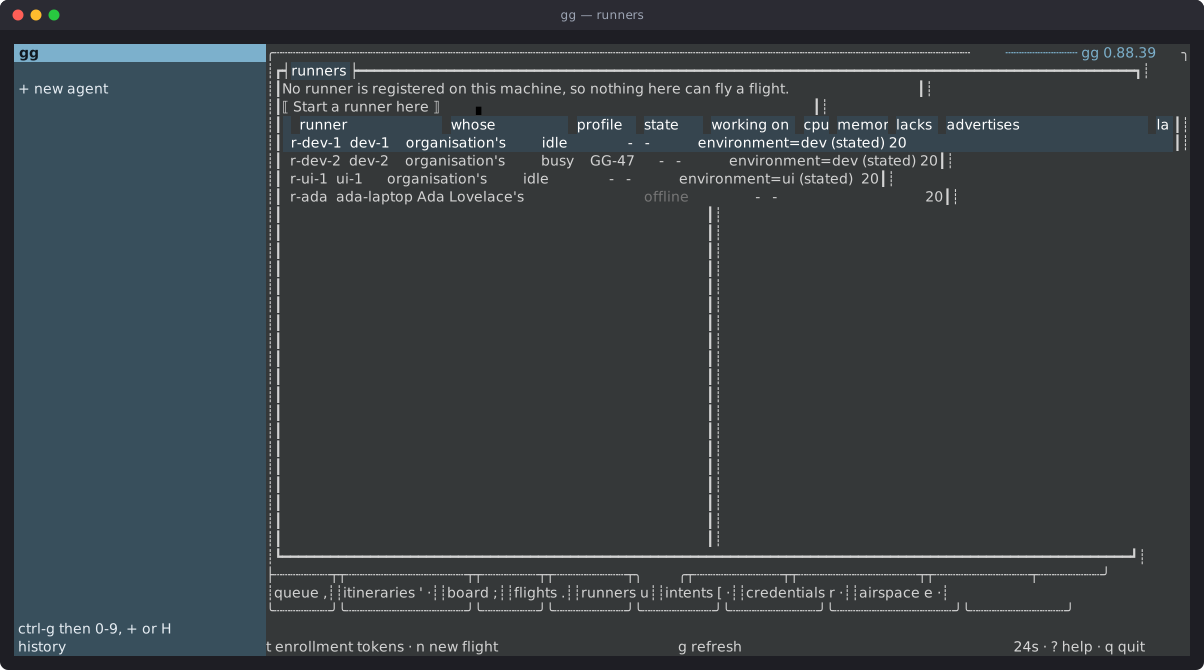
gg runnersEach runner is listed with whose it is, whether it is reserved, and the fleet profile it enrolled under, if any. To see what each runner advertises, which decides the flights it can be offered, run:
gg runner labelsA flight goes only to a runner whose labels carry what the flight asks for, such as its environment.
On the machine itself, gg doctor checks what the runner needs, including whether the agent is configured and present and whether the machine can reach a repository host to clone from.
In the console, the runners tab (u) lists the fleet with this machine’s runner first. enter opens a runner.
Taking a runner out of the fleet
Section titled “Taking a runner out of the fleet”To take a runner out of the fleet for good, run, from any signed-in machine:
gg runner retire <id|name>gg runners shows each runner’s id and name. A machine that keeps its runner credential resumes its old identity when it starts again rather than registering afresh, so retire a runner before enrolling the same machine again.
Next steps
Section titled “Next steps”- Add machines to the fleet: enrolment tokens, fleet profiles and ownership.
- Add and send credentials: give a runner the credentials its flights need.
- Update gg: move a runner to a newer release.