Driving an agent
Most flights run with nobody watching: a runner takes the flight, runs the agent on its own, and reports what happened. Sometimes a person wants to be closer to the work. gg offers several ways to do that, which differ in two respects: whether there is a flight, and whether the person can type to the agent or only watch.
| Way | A flight? | Where the agent runs | The person can |
|---|---|---|---|
| Fly a flight by hand | Yes | This machine, in the person’s own terminal | Type to it |
| Watch a runner | Whatever it is flying | Another machine | Watch only |
| Open a flight for one machine and watch it | Yes | One named machine | Watch only |
| Hold an agent beside gg | No | This machine | Type to it |
| Drive an agent on another machine | No | Another machine | Type to it |
To take a flight away from its runner and finish the work by hand, see Take over a flight.
Flying a flight by hand
Section titled “Flying a flight by hand”y on the console’s main screen opens a new flight and flies it on this machine, with the person at the keyboard. gg starts a runner for that one flight, and that runner gives the person’s own terminal to the agent, running interactively in the flight’s working copy of the repository. The flight is governed by its envelope like any other: the same rules decide what it may concern and where its work may land, and any gate it reaches is answered from the same session.
Because a person holds the terminal, the runner cannot measure the agent’s run the way it measures a flight that runs alone. Instead of recording how the agent’s run ended, it records that the session was flown by hand: which agent binary and version ran, how long the person held it, and what could not be measured as a result.
Watching a runner
Section titled “Watching a runner”To follow what a runner is doing, run:
gg runner watch <id|name>In the console, w in a runner’s window does the same while the runner is checking in, and w in a flight’s window watches the flight. gg shows the agent’s output as it arrives, from the flight the machine is running now, and then whatever it flies next. Watching is read-only: nothing typed reaches the agent.
The output comes from the runner directly, over an encrypted channel between the two machines. It is not stored by the control plane.
An attended flight
Section titled “An attended flight”A person can open a flight for one particular machine, in order to watch it:
gg fly "why does login time out after an hour?" --runner <id|name> --attendedThe rules for this are stricter than for an ordinary flight sent to a machine with --runner:
- A machine must be named. Without
--runner, the request is refused, because the flight could otherwise be taken by any machine that matches. - Only the person who registered the machine may do this. Anyone in the organisation may send work to a machine, but watching it means reading what it is doing.
- The machine must be free. If it is already flying, the request is refused rather than queued.
- The machine must take the flight promptly. If it does not claim the flight within the time it is expected to check in, the flight ends
grounded, with no person named as the one who stopped it.
Once the machine takes the flight, watch it as described above.
The agent column
Section titled “The agent column”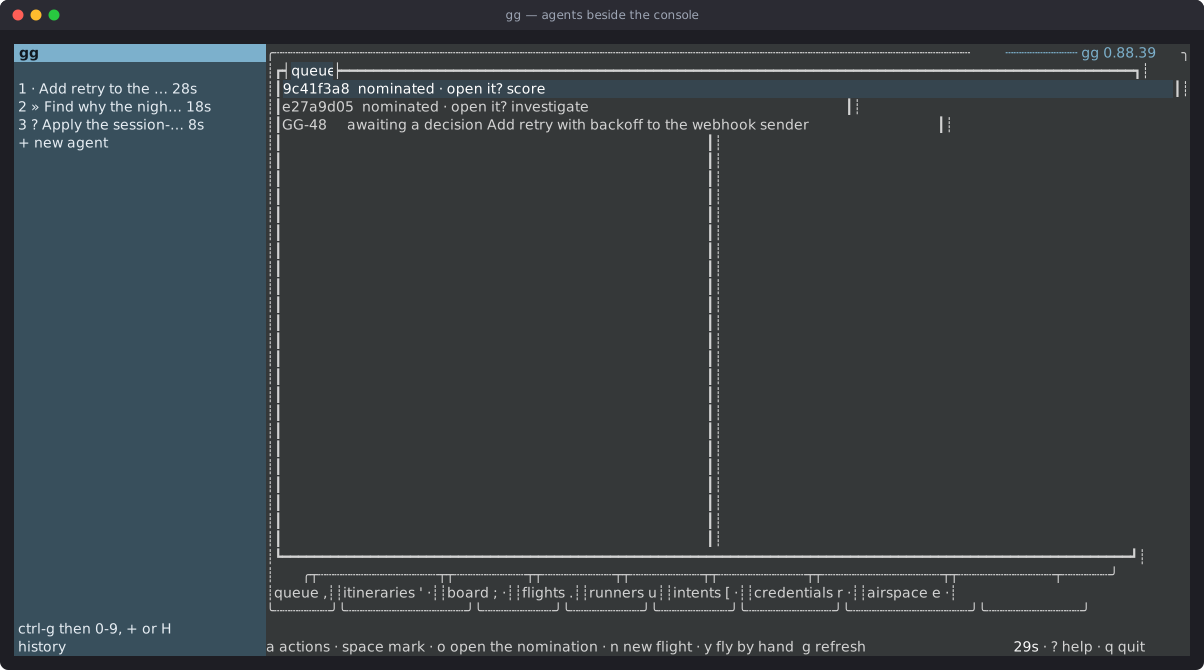
The console can hold agents beside gg itself, each running in a terminal of its own inside gg, and switch between them. Agents keep running while another one, or gg, is on screen. A column on the left lists gg, then each agent, then + new agent, then the history of earlier sessions. At most nine agents are held at once.
| Keys | What they do |
|---|---|
ctrl+g, then 0 |
Show gg. |
ctrl+g, then 1 to 9 |
Show that agent. |
ctrl+g, then + |
Start a new agent. |
ctrl+g, then H |
Show the history, from which an earlier session can be resumed. |
A new agent can be a Claude Code session in a chosen directory, or an agent started for a purpose, such as managing gg (its gates, board, flights and runners), managing the airspace, or planning a flight or an itinerary. The menu ends with Remote control…, which is described below.
Each local agent’s entry in the column shows what it is doing: » while it works, ? when it needs the person, and · while it waits. A • means its screen changed while it was hidden. gg learns this from the agent’s own hooks, which run gg mux mark; that command is for the hooks, not for people.
Quitting gg with agents running asks first, and names the local agents that will stop.
Driving an agent on another machine
Section titled “Driving an agent on another machine”A person can start an agent on another machine in the fleet and drive it from their own console, with no flight involved. This suits work that does not fit a flight, such as exploring a problem on a machine that has the right tools.
From the agent column, choose + new agent, then Remote control…. gg lists the machines that will accept a session. Choosing one opens that machine’s window on its sessions, where:
| Key | What it does |
|---|---|
n |
Start a session on the machine. |
enter |
Attach to a running session, or resume one that ended. |
d |
Forget a session that ended. |
D |
Forget every session that ended. |
The session then appears in the agent column like a local one. Until the machine answers, which happens the next time it checks in, its entry says it is being reached.
What runs on the machine
Section titled “What runs on the machine”The machine runs the agent’s own interactive program in a terminal it owns, in an empty directory of its own for that session. The person sees the agent’s screen and types to it as if it were local.
- The latest person to attach drives. Anyone attached earlier can still see the session but can no longer type to it.
- A session outlives the console. Quitting gg leaves remote sessions running, and attaching again replays the most recent part of the screen.
- A machine holds at most three sessions, and ends a session that has been idle for four hours.
- A machine that is flying refuses new sessions. A session already running keeps running.
- Remote entries in the agent column show no activity marks, because the agent’s hooks run on the other machine.
Who may drive a machine
Section titled “Who may drive a machine”A session starts only when both of these hold:
- The machine allows it. Its own configuration file must say
"accept-agent-sessions": true. This setting is read only from that file: it cannot be set by an environment variable or offered by the control plane, so turning it on means opening the file on that machine. A machine without it refuses the session and names the setting. - The person may reach the machine. A machine someone has claimed admits only its owner. Any other machine admits the person who registered it, or an administrator of the organisation.
Add machines to the fleet explains claiming.
What is recorded
Section titled “What is recorded”The control plane records who reached which machine, and when, and each machine reports its sessions: who last attached and how long each ran. It records nothing of what was typed or shown. The agent keeps its own record of the conversation, on that machine.
How the console reaches a machine
Section titled “How the console reaches a machine”Watching a runner, driving an agent on another machine, sending a credential and signing a runner’s agent in all use a channel: a direct, encrypted connection between the console and the runner. The control plane arranges each channel but cannot read it.
- The console asks the control plane for an introduction to a runner, stating what it is for. The control plane checks that the person may make that request of that machine, and the introduction is valid for one minute.
- The connection details are sealed. The console seals its offer to the runner’s registered key, and the runner seals its answer to a single-use key of the console’s. The control plane passes both along, and the runner picks up the offer when it next checks in. Neither the control plane nor anything else carrying them can read the details, and the encryption detects any alteration.
- The two machines connect with WebRTC, which encrypts everything that crosses the connection.
The console remembers each runner’s key the first time it reaches the runner, and checks it every time after. If the key changes, gg refuses to send anything to that runner until a person runs gg runner repin <id>. Add machines to the fleet covers this.
Finding a way through
Section titled “Finding a way through”The two machines are often on different networks. Each asks a STUN server how it appears from outside its network; a machine’s fleet profile can list these servers under relays, and gg ships none of its own. When the two machines can reach each other this way, the connection is direct.
When they cannot, the channel can fall back to a relay: a server that forwards the encrypted traffic between them without being able to read it. When the organisation’s control plane is configured with a relay, each introduction carries short-lived credentials for it, issued separately to each side. The channel reports which way it connected: directly, directly through the network’s address translation, or through the relay.
Limits
Section titled “Limits”- A relay is reached over its standard ports only; relaying over the port used for secure web traffic is not supported.
gg doctorchecks whether the STUN servers can be reached. It does not test the relay.- Driving an agent on another machine is offered only from the console. No gg command does it.
- Only Claude Code is supported as the agent for these sessions.